
mm-ctx
Fast, multimodal context for agents





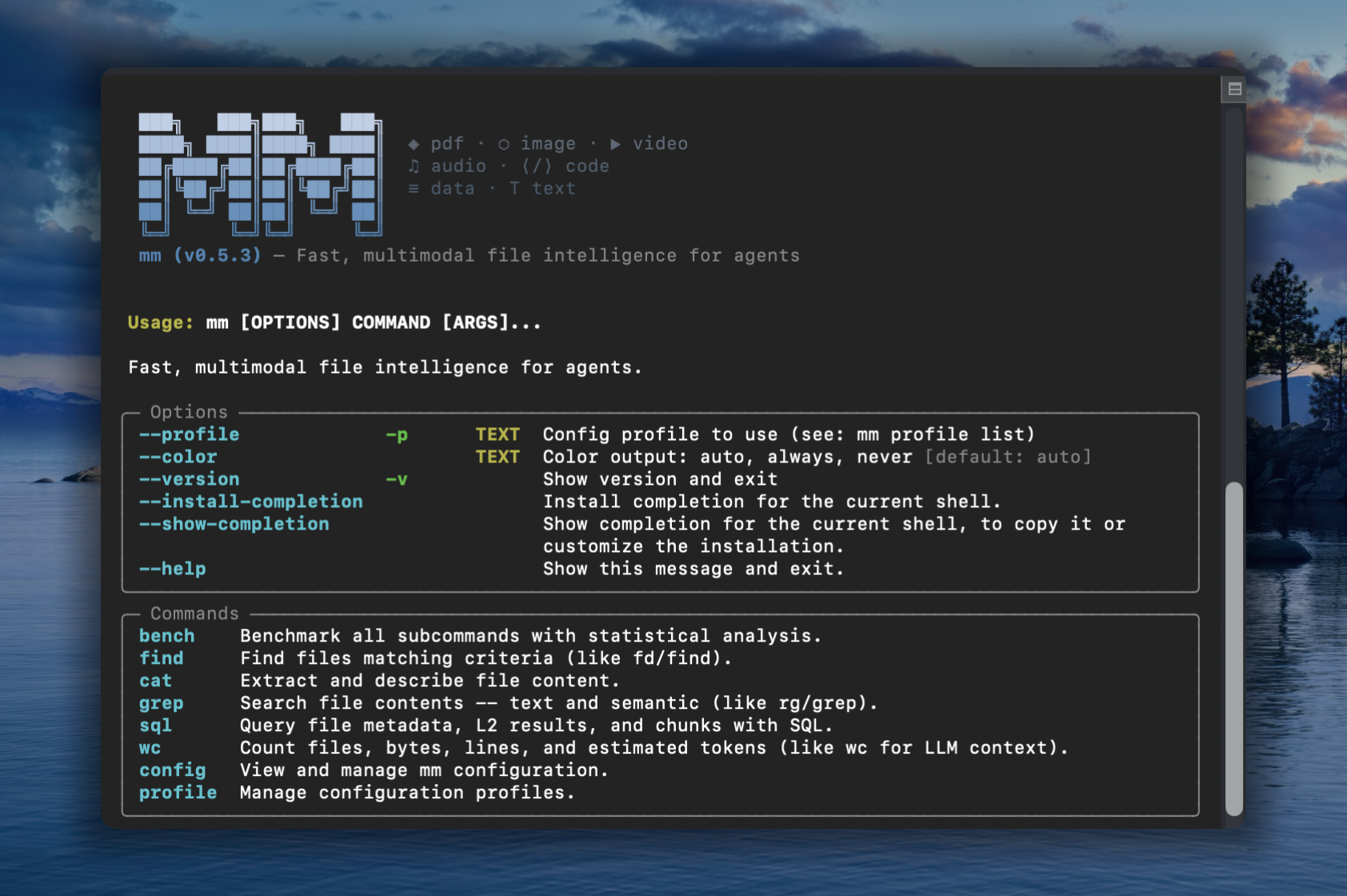
Familiar UNIX CLI tools like find, grep, cat — with multimodal powers.
mm offers both a CLI and a Python API that let agents work with file types LLMs can't natively read: images, video, audio, PDFs, and other binary formats. Rust core for speed, Python for dev-ex, UNIX philosophy for composability.
Installation
# with pip
pip install mm-ctx

# with uv
uv pip install mm-ctx

# or run directly without installing
uvx --from mm-ctx mm --help
Alternative methods
# macOS / Linux (shell installer)
curl -LsSf https://vlm-run.github.io/mm/install/install.sh | sh

# Windows (PowerShell)
irm https://vlm-run.github.io/mm/install/install.ps1 | iex
CLI
Commands that mirror familiar Unix tools but operate on multimodal semantics. Indexing is implicit — every command auto-builds a metadata index on first use.
Metadata commands (find, wc with --format json) run in ~60ms on 700 files via the Rust fast path.
Sample files
Download sample files from vlm.run to try the examples below:
mkdir mm-samples && cd mm-samples
curl -LO https://storage.googleapis.com/vlm-data-public-prod/hub/examples/image.caption/bench.jpg
curl -LO https://storage.googleapis.com/vlm-data-public-prod/hub/examples/document.invoice/wordpress-pdf-invoice-plugin-sample.pdf
curl -LO https://storage.googleapis.com/vlm-data-public-prod/hub/examples/video/Timelapse.mp4
curl -LO https://storage.googleapis.com/vlm-data-public-prod/hub/examples/mixed-files/mp3_44100Hz_320kbps_stereo.mp3
Multimodal directory
With all 4 files downloaded, mm treats the folder as a multimodal workspace:
$ mm find mm-samples/ --tree
mm-samples  (4 files, 3.5 MB)
├── Timelapse.mp4  [3.0 MB]
├── bench.jpg  [253.8 KB]
├── mp3_44100Hz_320kbps_stereo.mp3  [286.0 KB]
└── wordpress-pdf-invoice-plugin-sample.pdf  [42.6 KB]
$ mm wc mm-samples/ --by-kind
kind      files  size      lines (est.)  tokens (est.)  tok_per_mb
audio     1      286.0 KB  0             85             304
document  1      42.6 KB   29            176            4.2K
image     1      253.8 KB  0             425            1.7K
video     1      3.0 MB    0             85             29
—————
total     4      3.5 MB    29            771            218
$ mm find mm-samples/ --columns name,kind,size,ext
name                                     kind      size     ext
bench.jpg                                image     259865   .jpg
Timelapse.mp4                            video     3113073  .mp4
mp3_44100Hz_320kbps_stereo.mp3           audio     292853   .mp3
wordpress-pdf-invoice-plugin-sample.pdf  document  43627    .pdf
$ mm cat mm-samples/wordpress-pdf-invoice-plugin-sample.pdf -n 10
wordpress-pdf-invoice-plugin-sample.pdf — pages 1-1 of 1:

--- Page 1 ---
INVOICE
Sliced Invoices
Suite 5a-1204 123 Somewhere Street
Your City AZ 12345
admin@slicedinvoices.com
Invoice Number: INV-3337
Invoice Date: January 25, 2016
Due Date: January 31, 2016
Total Due: $93.50
0.8s • 42.6 KB • 53.2 KB/s
$ mm cat mm-samples/bench.jpg -m accurate
<description>
This outdoor daytime photograph captures a peaceful park scene on a sunny day. The primary focus is a modern dark gray metal slat bench  positioned in the foreground on a patch of green grass. The bench is set upon a small concrete pad, and its curved backrest and armrests  create a sleek, contemporary silhouette. Behind the bench, a paved walkway cuts through a well-maintained lawn.
</description>

Tags: park, bench, outdoors, summer, grass, trees, street, urban, leisure, sunlight

Objects: metal bench, tree, car, white SUV, red car, concrete pad, walkway, grass, street, building
$ mm grep "invoice" mm-samples/
wordpress-pdf-invoice-plugin-sample.pdf
    2 Payment is due within 30 days from date of invoice. Late payment is subject to fees of 5% per month.
    3 Thanks for choosing DEMO - Sliced Invoices | admin@slicedinvoices.com
   10 admin@slicedinvoices.com
Quick start
mm --version                                                    # print version
mm find mm-samples/ --tree --depth 1                            # directory overview with sizes
mm wc mm-samples/ --by-kind                                     # file/byte/token counts by kind

# PDF — text extraction (no LLM needed)
mm cat wordpress-pdf-invoice-plugin-sample.pdf                  # extract text
mm cat wordpress-pdf-invoice-plugin-sample.pdf -n 20            # first 20 lines

# Image / Video / Audio — require a configured LLM profile
mm cat bench.jpg -m accurate                                    # LLM caption
mm cat Timelapse.mp4 -m accurate                                # keyframe mosaic → LLM description
mm cat mp3_44100Hz_320kbps_stereo.mp3 -m accurate               # Whisper transcript → LLM summary
mm cat wordpress-pdf-invoice-plugin-sample.pdf -m accurate      # LLM-structured invoice
Python API
mm is also a library. mm.Context is the one class you need to build a multimodal prompt incrementally, then hand the whole thing to a VLM. Backed by a Rust core: O(1) insert/lookup, sub-millisecond render at 10K items.
The public namespace is intentionally tiny:
import mm
mm.Context              # the one class you use
mm.Ref                  # Annotated[str, "mm.Ref"] typed alias for ref ids
mm.RefNotFoundError     # KeyError subclass raised by ctx.get on miss
mm.uuid7()              # UUIDv7 helper (time-ordered default session_id)
Build a prompt
import mm
from pathlib import Path
from PIL import Image

ctx = mm.Context(session_id=mm.uuid7())      # or omit; auto-mints a UUIDv7

img:  mm.Ref = ctx.put(Path("photo.jpg"))
img2: mm.Ref = ctx.put(Image.open("x.png"),
                       metadata={"note": "product hero shot"})
doc:  mm.Ref = ctx.put(Path("paper.pdf"),
                       metadata={"summary": "Attention is all you need",
                                 "tags": ["nlp", "transformer"]})
vid:  mm.Ref = ctx.put(Path("clip.mp4"),
                       metadata={"scene": 3, "actor": "A"})
ctx.put(obj, *, metadata=...) accepts a pathlib.Path, a str (file path or http(s):// URL), bytes, or a PIL.Image.Image. metadata is a single free-form JSON-serialisable dict — note / summary / tags are conventional keys used by rendering surfaces; anything else flows through to the VLM as a leading text block per item. Every put returns a short kind-prefixed ref id like img_a1b2c3, typed as mm.Ref.
Emit VLM-ready messages (OpenAI / Gemini)
from openai.types.chat import ChatCompletionMessageParam
from google.genai import types as genai_types

messages_openai: list[ChatCompletionMessageParam] = ctx.to_messages(format="openai")
messages_gemini: list[genai_types.ContentDict]    = ctx.to_messages(format="gemini")
Drop messages_openai directly into client.chat.completions.create(messages=...), or messages_gemini into model.generate_content(contents=...). Per-kind encoder overrides:
messages: list[ChatCompletionMessageParam] = ctx.to_messages(
    format="openai",
    encoders={"image": "tile", "video": "mosaic"},
)
Unspecified kinds fall back to sensible defaults (image-resize, video-frame-sample, document-rasterize).
Round-trip and resolve
obj: Path | Image.Image | bytes | str = ctx.get(img)   # instance: returns the stored object
row: dict | None = mm.Context.get(f"{ctx.session_id}/{img}")  # classmethod: cross-session DB lookup
Instance ctx.get(ref) returns the exact Python object you put — identity is preserved for in-memory items (no copy, no rehydrate). Classmethod mm.Context.get("<session>/<ref>") resolves against the global ~/.local/share/mm/mm.db when you only have a ref string and no live Context.
Missed a ref? ctx.get("img_a1b2cZ") raises mm.RefNotFoundError (a KeyError subclass) with a Levenshtein-based "did you mean" and the full context table inline — agent-friendly by default.
Render
ctx.print_tree()                  # insertion-order tree with metadata
print(ctx.to_md(mode="fast"))     # markdown: ref | kind | source | content
print(repr(ctx))                  # markdown summary: ref | kind | source
Context(session=019da4…, items=4)
├── [1] img_a1b2c3  image     /abs/path/photo.jpg
├── [2] img_9f0e12  image     PIL.Image(RGB, 1024×768)
│        └─ note: "product hero shot"
├── [3] doc_d4e5f6  document  /abs/path/paper.pdf
│        ├─ summary: "Attention is all you need"
│        └─ tags: [nlp, transformer]
└── [4] vid_7890ab  video     /abs/path/clip.mp4
         ├─ scene: 3
         └─ actor: "A"
Context("~/data") continues to support the directory-scan surface (to_polars, to_pandas, to_arrow, sql, show, info). See docs/api.md for the full spec — print_tree layouts, cross-session resolution, and the deferred save() API.
Integrations
Claude Code
Install the mm-cli-skill via the skill marketplace:
claude
> /plugin marketplace add vlm-run/skills
> /plugin install mm-cli-skill@vlm-run/skills
> Organize my ~/Downloads folder using mm
npx skills
Install mm-cli-skill globally so any CLI assistant or agentic tool can discover it:
npx skills add vlm-run/skills@mm-cli-skill
Universal assistants (OpenClaw, NemoClaw, OpenCode, Codex, Gemini CLI)
Install the mm-cli-skill globally first, then start your preferred tool:
# One-time setup
npx skills add vlm-run/skills@mm-cli-skill

# Then use any CLI assistant — it will discover mm automatically
openclaw "Organize my ~/Downloads folder using mm"
codex "Find all PDFs in ~/docs and summarize them with mm"
The skill exposes mm's capabilities to any tool that supports the skills protocol.
Command reference
| Command | Purpose | Key flags |
|---|---|---|
find |
Find/list files, tree view, schema | --name, --kind, --ext, --min-size, --max-size, --sort, --reverse, --columns, --tree, --depth, --schema, --limit, --no-ignore, --format |
cat |
Content extraction (auto-detected by file type × mode) | --mode fast/accurate, -p (pipeline), -n, --no-cache, -v, --encode.*, --generate.*, --list-pipelines, --list-encoders, --format |
grep |
Content search across files | --kind, --ext, -C, --count, -i, --semantic, --index, --no-ignore, --format |
sql |
SQL queries on file index, results, chunks, and embeddings | --dir, --pre-index, --format, --list-tables |
wc |
Count files, size, lines (est.), tokens (est.) | --kind, --by-kind, --format |
bench |
Benchmark suite | --rounds, --warmup, --mode, --format |
config |
Extraction mode settings | show, init, set, reset-db, reset-profiles, reset |
profile |
Manage LLM provider profiles | list, add, update, use, remove, --format |
find — locate/list, tree, and schema
mm find ~/data --kind image                               # all images
mm find ~/data --kind video --sort size --reverse         # videos by size
mm find ~/data --ext .pdf --min-size 10mb                 # large PDFs
mm find ~/data --kind image --limit 5 --format json       # JSON output
mm find ~/data --name "test_.*\.py"                       # regex name match
mm find ~/data -n config                                  # substring name match

mm find ~/data --sort size --reverse --limit 20        # tabular listing
mm find ~/data --kind document --columns name,size,ext
mm find ~/data --tree --depth 2                        # hierarchical tree view
mm find ~/data --tree --kind video                     # tree filtered to videos
mm find ~/data --schema                                # column names, types, descriptions
mm find ~/data --format json                           # full metadata JSON
mm find ~/data --no-ignore                             # include gitignored files
cat — content extraction
mm cat wordpress-pdf-invoice-plugin-sample.pdf                  # extract text (no LLM needed)
mm cat wordpress-pdf-invoice-plugin-sample.pdf -n 20            # first 20 lines (head)
mm cat wordpress-pdf-invoice-plugin-sample.pdf -n -20           # last 20 lines (tail)
mm cat bench.jpg -m accurate                                     # LLM caption
mm cat Timelapse.mp4 -m accurate                                 # mosaic → LLM description
mm cat bench.jpg -p resize                                       # use named encoder
mm cat bench.jpg -p my-pipeline.yaml                             # custom pipeline YAML
mm cat Timelapse.mp4 -m accurate --no-cache                      # force fresh LLM call
mm cat bench.jpg -m accurate -v                                  # verbose (shows pipeline tree)
mm cat --list-pipelines                                          # list registered pipelines
mm cat --list-encoders                                           # list registered encoders
wc — count files, size, tokens
mm wc ~/data --by-kind
mm wc ~/data --by-kind --format json
grep — content search
mm grep "attention" ~/data --kind document
mm grep "TODO" ~/data --kind code
mm grep "invoice" ~/data --count               # match counts per file
mm grep "Quantum Phase" ~/data -i              # case-insensitive search
mm grep "secret" ~/data --no-ignore            # search gitignored files
mm grep "revenue forecast" ~/data -s             # semantic (vector) search
mm grep "architecture" ~/data -s --index          # auto-index before search
sql — query the index
Queries file metadata via scan + SQLite, or results and chunks from the persistent SQLite store.
mm find ~/data --schema                          # see available columns
mm sql "SELECT kind, COUNT(*) as n, ROUND(SUM(size)/1e6,1) as mb \
  FROM files GROUP BY kind ORDER BY mb DESC" --dir ~/data

# Query stored tables directly (auto-detected from table name)
mm sql "SELECT file_uri, summary FROM l2_results LIMIT 10"
mm sql "SELECT file_uri, chunk_idx, LENGTH(chunk_text) FROM chunks"
mm sql "SELECT * FROM files WHERE kind='image'" --dir ~/data --pre-index  # index before query
mm sql --list-tables                              # show available tables
Output modes
- TTY: Rich formatted tables/panels
- Piped: plain TSV/text (machine-readable, no ANSI)
**--format json**: JSON output on any command that supports it**--format csv**: Comma-separated values**--format dataset-jsonl**: JSONL for dataset export**--format dataset-hf**: HuggingFace Datasets format (requires--output-dir)
Verbose mode (--verbose / -v)
mm cat <file> [OPTIONS] --verbose shows the pipeline execution tree after content:
pipeline
  ├─ encode: resize · 0.0s → 1 parts (1 image)
  └─ generate: ollama · 2.3s · 354→195 tokens
Processing Modes
| Mode | What | Speed | How |
|---|---|---|---|
| fast (default) | Local extraction — text from PDF, image hash/EXIF, video metadata | <100ms/file | pypdfium2 (PDF), Rust mmap (images), mp4parse/matroska (video) |
| accurate | LLM-powered semantic understanding (captions, descriptions, summaries) | Varies | LLM API via active profile + pipeline config |
Metadata scanning (find, wc) always uses Rust-native extraction (~60ms / 700 files).
Performance
Benchmarked on Apple Silicon (M-series), 702 files (7.2GB):
| Operation | Latency |
|---|---|
| Metadata scan (702 files) | 8ms |
CLI cold start (find --format json) |
60ms |
CLI cold start (find --schema --format json) |
109ms |
CLI cold start (sql) |
300ms |
| Fast code extraction | ~52ms |
| Fast image extraction | ~61ms |
| Fast PDF text extraction | ~220ms |
| Fast video metadata | <100ms |
| PDF page mosaic (per page) | ~10ms |
| Video keyframe mosaic (48 frames) | ~1s |
Storage
mm uses a global SQLite database at ~/.local/share/mm/mm.db with sqlite-vec for vector search:
| Table | Contents | Relationship |
|---|---|---|
files |
File metadata + content (one row per file, uri = absolute path) |
— |
l2_results |
LLM-generated summaries (many per file) | FK → files.uri |
chunks |
~2048-char content chunks | FK → l2_results.id |
chunks_vec |
Embedding vectors (sqlite-vec virtual table) | FK → chunks.id |
cache |
Key-value result cache | — |
The files table includes metadata columns (path, size, kind, etc.) and content columns (content_hash, text_preview, line_count, duration_s, exif_*, video_codec, etc.).
Use mm config reset-db to clear all databases and caches.
Pipelines — encode + generate
Pipelines are YAML configs under pipelines/{kind}/{mode}.yaml that pair an encoder with optional LLM generation parameters. When generate is null, the pipeline is encode-only (no LLM call). Encoders are Python classes under encoders/ that convert media files into VLM-ready Messages. See [docs/PIPELINES.md](docs/PIPELINES.md) and [docs/ENCODERS.md](docs/ENCODERS.md) for the full pipeline and encoder reference.
Pipeline fields can be overridden from the CLI:
mm cat photo.jpg -m accurate --encode.strategy tile --generate.max-tokens 1024
mm cat photo.jpg -m accurate --generate.temperature 0.5
Load explicit pipeline YAML(s) with -p (repeatable, dispatched by kind field):
mm cat photo.jpg -p my-image-pipeline.yaml
mm cat *.jpg *.mp4 -p image-pipeline.yaml -p video-pipeline.yaml
mm cat photo.jpg -p ~/custom.yaml --generate.max-tokens 512
Custom pipeline paths can also be set in ~/.config/mm/mm.toml:
[pipelines]
image.fast = "/path/to/my-image-fast.yaml"
video.accurate = "/path/to/my-video-accurate.yaml"
LLM Configuration using Profiles
For accurate mode, mm uses the openai Python SDK to call any OpenAI-compatible API. Provider settings are managed through profiles — named configurations stored in ~/.config/mm/mm.toml.
Quick setup
mm config init                # create config with default profile (local Ollama)
mm config show                # show resolved config with sources
Managing profiles
Each profile stores base_url, api_key, and model. You can have as many as you need — one per provider, one per use-case, etc.
# Add custom profiles
mm profile add openai --base-url https://api.openai.com/v1 --api-key sk-... --model gpt-4o
mm profile add openrouter --base-url https://openrouter.ai/api/v1 --model qwen/qwen3.5-27b

# Update reserved profiles (ollama, gemini, vlmrun)
mm profile update ollama --base-url http://localhost:11434 --model qwen3.5:9B

# List all profiles (● = active)
mm profile list

# Switch the active profile
mm profile use openai

# Update a field on an existing profile
mm profile update openai --model gpt-4o-mini --api-key sk-new-key

# Remove a profile (cannot remove the active one)
mm profile remove openai
Selecting a profile per-command
# --profile flag (one-off override, does not change active profile)
mm --profile openai cat photo.png -m accurate

# Environment variable
MM_PROFILE=openai mm cat photo.png -m accurate
Resolution order
Provider settings (base_url, api_key, model) come from the active profile, falling back to built-in defaults.
The active profile is resolved as:
--profile flag > MM_PROFILE env > active_profile in config file > "ollama"
Config file format
# ~/.config/mm/mm.toml
active_profile = "ollama"

[profile.ollama]
base_url = "http://localhost:11434"
api_key = ""
model = "qwen3.5:0.8"

[profile.gemini]
base_url = "https://openrouter.ai/api/v1"
api_key = "<OPENROUTER_API_KEY>"
model = "google/gemini-2.5-flash-lite"

[profile.vlmrun]
base_url = "https://api.vlm.run/v1/openai"
api_key = "<VLMRUN_API_KEY>"
model = "Qwen/Qwen3.5-0.8B"
License
MIT